・How to borrow and return bikes
*How to use Bicycle Sharing
・How to rent and return electric EV 3-wheeled bikes
※How to use Tokyo EV Bike
・How to register a card key or smartphone key
*If you register a card key or smartphone key, you can unlock the bike by simply touching it, without having to reserve it.
How to view the application
About the Icons
●Number of availabl bikes
Displays the number of bicycles available for rent at the port.
Number of returnable bikes
Indicates whether it can be returned to the port. Please pay attention to the return port.
●About the display on the port icon
●Battery symbol in port details
About Home Screen
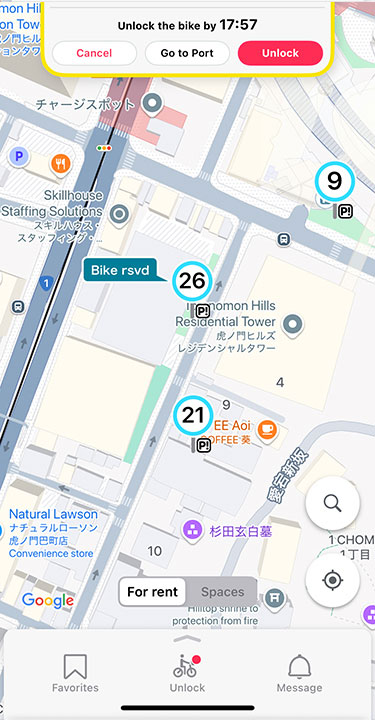
- (1)status display
-
- The status of either No Reservation, Booked, or In Use will be displayed.
*The display is updated every minute. If it does not change, please wait a moment.
- The status of either No Reservation, Booked, or In Use will be displayed.
- (2)Current location button
-
- Displays a MAP of the area around your current location.
*Permission to obtain location information is required to use this service.
- Displays a MAP of the area around your current location.
- (3)Search button
-
- You can search for port locations by region, location, station name.
- (4)Menu
-
- Favorite: You can see a list of bike ports that you have registered as favorites in the port details. Register frequently used ports from the port details screen.
- Unlock: Tap here if you want to ride the bike in front of you.
- Notices: You can check the notices from the management and for you.
- Problem Reporting: You can easily report a problem with your bicycle. *No charge if the bike is returned to the same port within 5 minutes of unlocking.
- Usage history: Displays usage history for the past two months. Receipts can also be issued here.
- Support: We accept questions, etc. via our FAQs and contact form.
- Account: You can check and change your registered information. You can also prepare for electric tricycle rides and register your card key and smartphone key here.
- How to use:You can check how to unlock, lock, and use the bicycle in the app.
- Other: You can check information about services and applications.